
Sunday, January 10, 2010
String processing.
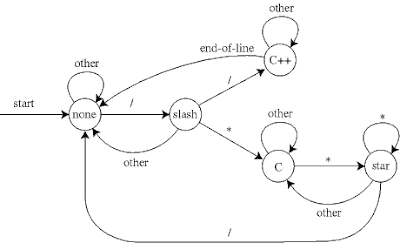
String processing. The program CommentStripper.java reads in a Java (or C++) program from standard input, removes all comments, and prints the result to standard output. This would be useful as part of a Java compiler. It removes /* */ and // style comments using a 5 state finite state automaton. It is meant to illustrate the power of DFAs, but to properly strip Java comments, you would need a few more states to handle extra cases, e.g., quoted string literals like s = "/***//*". The picture below is courtesy of David Eppstein.


DEFINATION & DESCRIPTION OF Finite state automata.

Finite state automata. A deterministic finite state automaton (DFA) is, perhaps, the simplest type of machine that is still interesting to study. Many of its important properties carry over to more complicated machines. So, before we hope to understand these more complicated machines, we first study DFAs. However, it is an enormously useful practical abstraction because DFAs still retain sufficient flexibility to perform interesting tasks, yet the hardware requirements for building them are relatively minimal. DFAs are widely used in text editors for pattern matching, in compilers for lexical analysis, in web browsers for html parsing, and in operating systems for graphical user interfaces. They also serve as the control unit in many physical systems including: vending machines, elevators, automatic traffic signals, and computer microprocessors. Also network protocol stacks and old VCR clocks. They also play a key role in natural language processing and machine learning.
A DFA captures the basic elements of an abstract machine: it reads in a string, and depending on the input and the way the machine was designed, it outputs true or false. A DFA is always is one of N states, which we name 0 through N-1. Each state is labeled true or false. The DFA begins in a distinguished state called the start state. As the input characters are read in one at a time, the DFA changes from one state to another in a prespecified way. The new state is completely determined by the current state and the character just read in. When the input is exhausted, the DFA outputs true or false according to the label of the state it is currently in.
UPPER PICTURE is an example of a DFA that accepts binary strings that are multiples of 3. For example, the machine rejects 1101 since 1101 in binary is 13 in decimal, which is not divisible by 3. On the other hand, the machine accepts 1100 since it is 12 in decimal.
Abstract machines
Abstract machines. Modern computers are capable of performing a wide variety of computations. An abstract machine reads in an input string, and, depending on the input, outputs true (accept), outputs false (reject), or gets stuck in an infinite loop and outputs nothing. We say that a machine recognizes a particular language, if it outputs true for any input string in the language and false otherwise. The artificial restriction to such decision problems is purely for notational convenience. Virtually all computational problems can be recast as language recognition problems. For example, to determine whether an integer 97 is prime, we can ask whether 97 is in the language consisting of all primes {2, 3, 5, 7, 13, ... } or to determine the decimal expansion of the mathematical constant π we can ask whether 7 is the 100th digit of π and so on.
We would like to be able to formally compare different classes of abstract machines in order to address questions like Is a Mac more powerful than a PC? Can Java do more things than C++? To accomplish this, we define a notion of power. We say that machine A is at least as powerful as machine B if machine A can be "programmed'" to recognize all of the languages that B can. Machine A is more powerful than B, if in addition, it can be programmed to recognize at least one additional language. Two machines are equivalent if they can be programmed to recognize precisely the same set of languages. Using this definition of power, we will classify several fundamental machines. Naturally, we are interested in designing the most powerful computer, i.e., the one that can solve the widest range of language recognition problems. Note that our notion of power does not say anything about how fast a computation can be done. Instead, it reflects a more fundamental notion of whether or not it is even possible to perform some computation in a finite number of steps.
We would like to be able to formally compare different classes of abstract machines in order to address questions like Is a Mac more powerful than a PC? Can Java do more things than C++? To accomplish this, we define a notion of power. We say that machine A is at least as powerful as machine B if machine A can be "programmed'" to recognize all of the languages that B can. Machine A is more powerful than B, if in addition, it can be programmed to recognize at least one additional language. Two machines are equivalent if they can be programmed to recognize precisely the same set of languages. Using this definition of power, we will classify several fundamental machines. Naturally, we are interested in designing the most powerful computer, i.e., the one that can solve the widest range of language recognition problems. Note that our notion of power does not say anything about how fast a computation can be done. Instead, it reflects a more fundamental notion of whether or not it is even possible to perform some computation in a finite number of steps.
DEFNATION OF Turing machines
Turing machines are the most general automata. They consist of a finite set of states and an infinite tape which contains the input and is used to read and write symbols during the computation. Since Turing machines can leave symbols on their tape at the end of the computation, they can be viewed as computing functions: the partial recursive functions. Despite the simplicity of these automata, any algorithm that can be implemented on a computer can be modeled by some Turing machine.
Turing machines are used in the characterization of the complexity of problems. The complexity of a problem is determined by the efficiency of the best algorithm that solves it. Measures of an algorithm's efficiency are the amount of time or space that a Turing machine requires to implement the algorithm. A computation's time is the number of configurations involved in that computation, and its space corresponds to the number of positions on its tape that were used.
Turing machines are used in the characterization of the complexity of problems. The complexity of a problem is determined by the efficiency of the best algorithm that solves it. Measures of an algorithm's efficiency are the amount of time or space that a Turing machine requires to implement the algorithm. A computation's time is the number of configurations involved in that computation, and its space corresponds to the number of positions on its tape that were used.
DEFINATION ABOUT Automata Theory
Automata theory is a further step in abstracting your attention away from any
particular kind of computer or particular programming language. In automata theory
we consider a mathematical model of computing. Such a model strips the computational
machinery—the “programming language”—down to the bare minimum, so that it’s easy
to manipulate these theoretical machines (there are several such models, for different purposes, as you’ll soon see) mathematically to prove things about their capabilities.
For the most part, these mathematical models are not used for practical programming
problems. Real programming languages are much more convenient to use. But the very
flexibility that makes real languages easier to use also makes them harder to talk about in a formal way. The stripped-down theoretical machines are designed to be examined
mathematically.
What’s a mathematical model? You’ll see one shortly, called a “finite-state machine.”
The point of this study is that the mathematical models are, in some important ways,
to real computers and real programming languages. What this means is that
any problem that can be solved on a real computer can be solved using these models,and vice versa. Anything we can prove about the models sheds light on the real problems of computer programming as well.
The questions asked in automata theory include these: Are there any problems that
no computer can solve, no matter how much time and memory it has? Is it possible to
PROVE that a particular computer program will actually solve a particular problem? If a computer can use two different external storage devices (disks or tapes) at the same time,does that extend the range of problems it can solve compared to a machine with only one such device?
There is also a larger question lurking in the background of automata theory: Does
the human mind solve problems in the same way that a computer does? Are people
subject to the same limitations as computers? Automata theory does not actually answer this question, but the insights of automata theory can be helpful in trying to work out an answer. We’ll have more to say about this in the chapter on artificial intelligence
particular kind of computer or particular programming language. In automata theory
we consider a mathematical model of computing. Such a model strips the computational
machinery—the “programming language”—down to the bare minimum, so that it’s easy
to manipulate these theoretical machines (there are several such models, for different purposes, as you’ll soon see) mathematically to prove things about their capabilities.
For the most part, these mathematical models are not used for practical programming
problems. Real programming languages are much more convenient to use. But the very
flexibility that makes real languages easier to use also makes them harder to talk about in a formal way. The stripped-down theoretical machines are designed to be examined
mathematically.
What’s a mathematical model? You’ll see one shortly, called a “finite-state machine.”
The point of this study is that the mathematical models are, in some important ways,
to real computers and real programming languages. What this means is that
any problem that can be solved on a real computer can be solved using these models,and vice versa. Anything we can prove about the models sheds light on the real problems of computer programming as well.
The questions asked in automata theory include these: Are there any problems that
no computer can solve, no matter how much time and memory it has? Is it possible to
PROVE that a particular computer program will actually solve a particular problem? If a computer can use two different external storage devices (disks or tapes) at the same time,does that extend the range of problems it can solve compared to a machine with only one such device?
There is also a larger question lurking in the background of automata theory: Does
the human mind solve problems in the same way that a computer does? Are people
subject to the same limitations as computers? Automata theory does not actually answer this question, but the insights of automata theory can be helpful in trying to work out an answer. We’ll have more to say about this in the chapter on artificial intelligence
Friday, January 8, 2010
DESCRIPTION ABOUT EVENT CLASSES IN JAVA (OBJECT ORIENTED PROG)
EVENT CLASSES
The classes that represent events are the core of java’s event handling mechanism .
thus we begin our study of event handling with a tour of the event classes .As our will see,they provide a consistent ,easy-to-use means of encapsulatating events.
At the root of java event class hierarchy is Eventobject, which is in java .util.It
Is the superclass for all events.its one constructor is show here
EventObject(Object src)
Here , src is the object that generates this event.
EventObject contain two methods: getsource() & toString().The getsource() method return the source of events . its general form show here:
Objectgetsource()
As expected string() return the string equivalent of the event
The class AWTEvent , define with in the java.awt package , is a subclass of EventObject.it is the superclass(either directly or indirectly) of all AWT-based event used by the delegation event model.its getID() method can be used ti determine the type of the event .the signature of this method is show here
Int getID()
At this point , it is important to know only that all of the other classes discusses in this section are subclasses of AWTEvent.
TO SUMMARIZE:
EventObject is a superclass of all event
AWTEvent is a superclass os all AWT event that are handled by the delegation event model.
The package java.awt.event define several types of event that are generated by various user interface elements .the table below enumerates the most important of these event classes & provide a breif description of when they are generated .The most commonly
used constructors,
EVENT ClASS DESCRIPTION
ACTIONEVENT Generated whan a button is presses,a list item
is double-clicked or a menu item is selected .
AdjustmentEvent Generated when a scroll bar is mainuplated.
ComponentEvent Generated when a component is hidden,moved,resizes,
Or become visible.
ContainerEvent Generated when a component is added to removes from a
Container.
FocusEvent Generated when a component gains or loses keyboard focus.
InputEvent Abstract super class for all component input event classes.
The classes that represent events are the core of java’s event handling mechanism .
thus we begin our study of event handling with a tour of the event classes .As our will see,they provide a consistent ,easy-to-use means of encapsulatating events.
At the root of java event class hierarchy is Eventobject, which is in java .util.It
Is the superclass for all events.its one constructor is show here
EventObject(Object src)
Here , src is the object that generates this event.
EventObject contain two methods: getsource() & toString().The getsource() method return the source of events . its general form show here:
Objectgetsource()
As expected string() return the string equivalent of the event
The class AWTEvent , define with in the java.awt package , is a subclass of EventObject.it is the superclass(either directly or indirectly) of all AWT-based event used by the delegation event model.its getID() method can be used ti determine the type of the event .the signature of this method is show here
Int getID()
At this point , it is important to know only that all of the other classes discusses in this section are subclasses of AWTEvent.
TO SUMMARIZE:
EventObject is a superclass of all event
AWTEvent is a superclass os all AWT event that are handled by the delegation event model.
The package java.awt.event define several types of event that are generated by various user interface elements .the table below enumerates the most important of these event classes & provide a breif description of when they are generated .The most commonly
used constructors,
EVENT ClASS DESCRIPTION
ACTIONEVENT Generated whan a button is presses,a list item
is double-clicked or a menu item is selected .
AdjustmentEvent Generated when a scroll bar is mainuplated.
ComponentEvent Generated when a component is hidden,moved,resizes,
Or become visible.
ContainerEvent Generated when a component is added to removes from a
Container.
FocusEvent Generated when a component gains or loses keyboard focus.
InputEvent Abstract super class for all component input event classes.
Thursday, January 7, 2010
DEFINATION OF LABEL CONTROL , STRING CONSTANT , VARIABLES
Label Control:
Currently the form does not contain any indication about what should be entered in the textbox. For such a purpose, Label control is used and the process of adding it is same. As in other controls studied so far “Text” property here is also used for indicating what should be displayed in the Label
String constant:
When you observe the above codes regarding message box you will identify that when displaying a predetermined set of characters (also known as String) in the message box, we used double quotes (“”). However when we wanted the contents of textbox which obviously depends upon the input of the user, we didn’t use the double quotes. Actually when any thing is written outside double quote it is considered to be something that the compiler/runtime should evaluate however things that are written in double quotes are considered as string constants
Variables:
Variables are place holders that can hold data values. For example age can be stored in a variable for further processing. Similarly Text property of TextBox is also a variable as it stores string values that are typed in the textbox.
Since C# is a strictly typed language therefore you must identify the data-type (e.g, integer, decimal, etc) while creating a variable. The process of creating a variable is known as declaration. Following is an example of declaring and integer variable. The example also includes statement to store a value in the declared variable which is known as assignment. When the variable is assigned a value first time, it is known as initialization.
The above statements can be combined into a single one which is indicated as follows
Variables are also created in classes but when created in classes they are known as properties. For example Microsoft created a variable named Text in class Label which is termed as property of label.
Currently the form does not contain any indication about what should be entered in the textbox. For such a purpose, Label control is used and the process of adding it is same. As in other controls studied so far “Text” property here is also used for indicating what should be displayed in the Label
String constant:
When you observe the above codes regarding message box you will identify that when displaying a predetermined set of characters (also known as String) in the message box, we used double quotes (“”). However when we wanted the contents of textbox which obviously depends upon the input of the user, we didn’t use the double quotes. Actually when any thing is written outside double quote it is considered to be something that the compiler/runtime should evaluate however things that are written in double quotes are considered as string constants
Variables:
Variables are place holders that can hold data values. For example age can be stored in a variable for further processing. Similarly Text property of TextBox is also a variable as it stores string values that are typed in the textbox.
Since C# is a strictly typed language therefore you must identify the data-type (e.g, integer, decimal, etc) while creating a variable. The process of creating a variable is known as declaration. Following is an example of declaring and integer variable. The example also includes statement to store a value in the declared variable which is known as assignment. When the variable is assigned a value first time, it is known as initialization.
The above statements can be combined into a single one which is indicated as follows
Variables are also created in classes but when created in classes they are known as properties. For example Microsoft created a variable named Text in class Label which is termed as property of label.
INTRO ABOUT IDE • Visual Studio • Solution Explorer • ToolBox IN . NET PROGRAMMING


IDE
An Integrated Development Environment (IDE) brings all of the programmers tools into one convenient place. There was a time when programmers had to edit files, save the files out, run the compiler, then the linker, build the application then run it through a debugger.
Today's IDEs bring editor, compiler, linker and debugger into one place along with project management tools to increase programmer productivity.
Visual Studio
Visual Studio is an IDE for building ASP.NET Web applications, XML Web Services, desktop applications, and mobile applications. Visual Basic, Visual C++, Visual C#, and Visual J# all use the same integrated development environment (IDE), which allows them to share tools and facilitates in the creation of mixed-language solutions
For creating new projects navigate to the menu indicated in the following figure 2.1
After clicking the above menu button following screen will be displayed from which you will have to select the project type and language. The figure 2.2 shows selection of “windows application” using C# language. After choosing the appropriate template i.e. “Windows Application” give a name to the project and specify a location on which you want the application to be stored.
Once you create the application a screen similar to the following will be created.
As can be observed that the IDE consists of a number of menus and windows. Let’s see the purpose of each window that can be seen on the screen. On the top left is the solution explorer. Figure 2.4 focuses on solution explorer only.
Solution Explorer allows you to view items and perform item management tasks in a solution or a project. It also allows you to use the Visual Studio editors to work on files outside the context of a solution or project. A single solution and its projects appear in a hierarchical display of solution explorer that provides updated information about the status of your solution, projects, and items. This allows you to work on several projects at the same time. Because the selected project and item determines the toolbar icons, this list is a partial representation of those you might encounter while working in Solution Explorer.
Properties
Displays the appropriate property user interface for the selected item in the tree view.
Show All Files
Shows all project items, including those that have been excluded and those that are normally hidden.
Refresh
Refreshes the state of the items in the selected project or solution.
View Class Diagram
Launches Class Designer to display a diagram of the classes in the current project. For more information, see Designing Classes and Types.
View Code
Opens the selected file for editing in the Code Editor.
View Designer
Opens the selected file for editing in the designer mode of the Code Editor.
Add New Solution Folder
Adds a Solution Folder to the selected item. You can add a Solution Folder to the solution or to an existing Solution Folder.
Apart from solution explores you can also see a properties window and a toolbox shown in the figure that are following.
The details of the above mentioned windows will be discussed later.
In figure 2.3 you must have observed the following at the center. This is the designer of form.
Subscribe to:
Posts (Atom)